Most of what you do on social media is free. But sometimes organic (what you post without paying) isn't enough: you have a harvest market in two weeks, a new product launching, an offer more people should see. Then you can pay the platform to show your post to people who don't follow you. This section helps you understand what you're actually buying, what it costs – and when it's worth the money.
What happens when you pay?
The simplest way is to sponsor a post (often called "boosting"): you take a post you've already made, press the button, choose an audience, a budget and a number of days. If you want more control there are the platforms' ad tools (for Facebook and Instagram it's called Meta Ads Manager) – but for most small producers, boosting goes a long way.
Behind the scenes it's an auction: everyone who wants to reach the same people bids for the same views, and competition sets the price. Three things worth understanding from the start:
- You're buying views, not customers. The platform promises your post will be shown to your chosen audience – not that anyone will come, click or buy. That part is down to the content.
- You set the ceiling. You choose a budget (total or per day) and a period. When the money runs out, the ad stops showing. It can never cost more than you set.
- The price follows the season. In the weeks before Christmas you're competing with every Christmas campaign and pay the most. Early spring is often the cheapest.
What does it cost? Honest benchmarks
Prices change all the time, but the order of magnitude looks roughly like this in Sweden:
- A local event (market, open farm, tasting): 300–800 kr over one to two weeks, targeted at a radius around the venue, is often enough to reach a few thousand up to ten thousand people nearby. This is the cheapest and most precise form.
- An offer or launch to a wider area (say, the whole island or region): 1,000–3,000 kr to be properly visible for a couple of weeks.
- Broad awareness (a region or the whole country, "more people should know we exist"): this starts at several thousand kronor per month – and needs stamina over months to stick. For most small producers it's the wrong place to start.
- Clicks to your website: count on roughly 7–15 kr per click when you pay for visits rather than views.
Benchmarks, not promises. The exact price depends on season, audience and competition. But one rule of thumb always holds: a small budget aimed at the right local audience beats a big budget aimed at the wrong one.
What should you pay for – and what works for free?
Never pay to compensate for a weak post – an ad only amplifies what already works. Think of it like this:
- Organic is usually enough for the nurturing job: everyday content, your followers, the things that get real engagement. That shouldn't cost money.
- Pay when there's a deadline: an event, a launch, an offer that has to land before a certain date. Organic reach is too slow and too uncertain when the clock is ticking.
- Pay when you're going beyond your followers: a new town, a new segment, visitors who haven't found you yet.
- Test for free first, sponsor the winner. Post organically, see which post gets the most engagement – and put the money on that one. Then you know the content carries.
The format: what you get when you sponsor
A sponsored post gets something organic posts don't: a real button with a link. Remember from the feed walkthrough that ordinary posts with links are down-prioritised – but in an ad, the call to action (what you want people to do) is built in: "Learn more", "Send message", "Interested" (for events) or "Shop now", linking wherever you want.
Good to know before you press the button:
- You need a business profile (free to set up) – private accounts can't advertise.
- Less text in the image works better. Let the image show, let the caption tell. One strong photo or a short video beats a poster full of text.
- You can't edit the post once it's been sponsored – proofread the price, date and link first.
- The post is labelled "Sponsored" – nothing to hide, everyone knows how it works.
Target using your segments
Here the segment work from step 1 literally pays for itself. The ad tools' filters ask for almost exactly what you already wrote on your segment cards:
- Where do they find you, and where do they want to buy? (question 3 on the card) → geography: choose a town or a radius around your location. The most important filter of all.
- Who are they – the situation? (question 1) → age and language: e.g. adults 30+, or English if the segment is visitors.
- What do they value? (question 2) → interests: choose 1–3 broad ones, e.g. "food and drink", "organic", "locally produced".
Works: the farm shop's harvest market → a 15 km radius around the shop, adults, no interest filters at all – close to home you want to reach broadly. The restaurant's theme night → radius + the interest "food and drink". The visitor segment → English + the location + the interest "travel".
Doesn't work: all of Sweden, 18–65, "everyone likes cheese, right?" – the budget gets spread so thin nobody is reached properly. Ten stacked interests – the audience gets so narrow the price races away. Targeting people who already follow you – when the goal was to find new ones.
The rule of thumb: take out the segment card before you build the ad. If the segment is fuzzy the ad gets expensive – sharpen the card first, not the budget.
When you're done: a thought-through campaign instead of a gamble
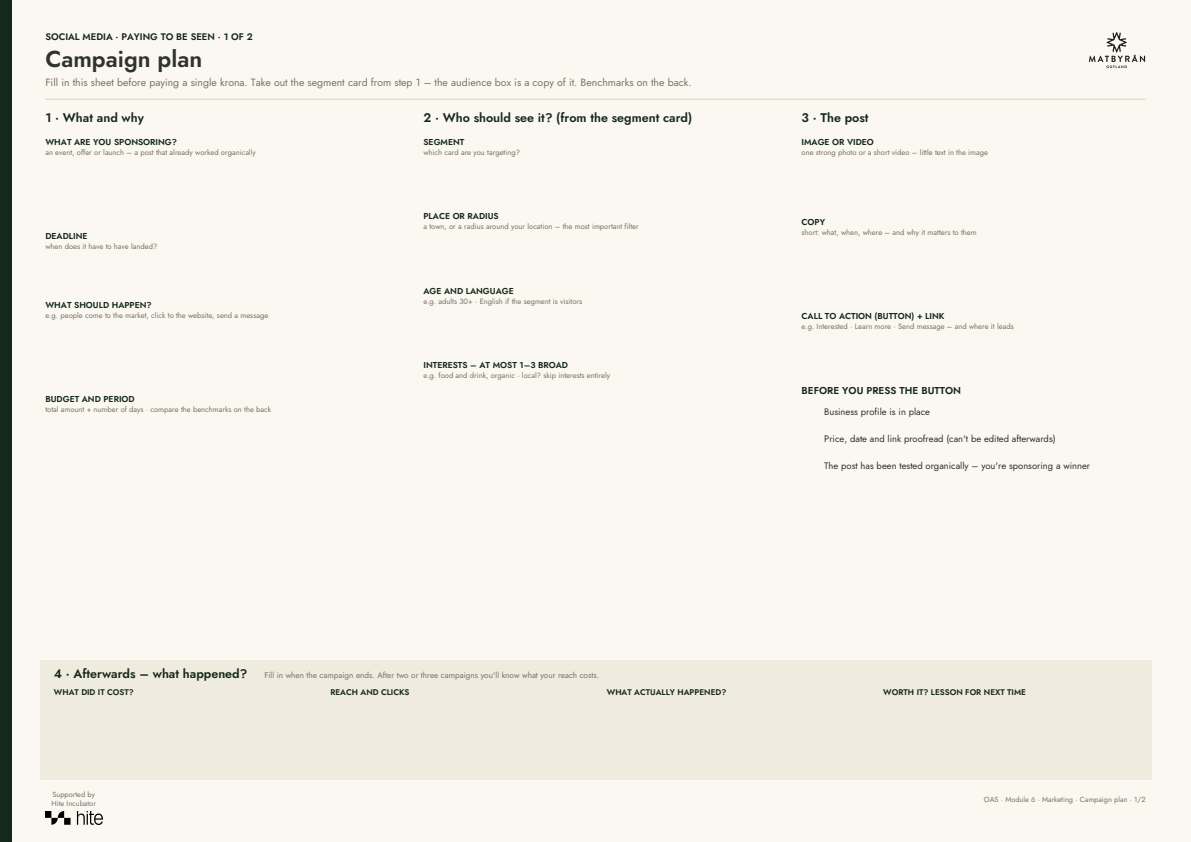
What you should have decided before paying a single krona: what you're sponsoring (and the deadline), what should happen (come to the event, click, order), who should see it (from the segment card: place/radius, age, language, at most a couple of interests), budget and period – and how you'll tell afterwards whether it was worth it.
Do this next
Fill in the campaign plan next time you have an event or offer coming up. Afterwards: write down what it cost and what it delivered – after two or three campaigns you'll know what your reach costs.